![Slasify_Logo_Black 1.svg]](https://support.slasify.com/hubfs/Slasify_Logo_Black%201.svg)
-
Login to your account in Slasify.
-
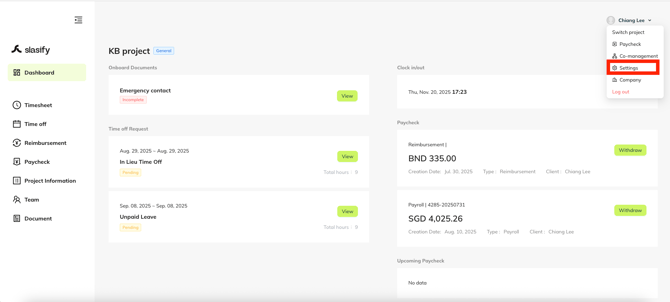
Go to your project and select “Settings” under your name.
-
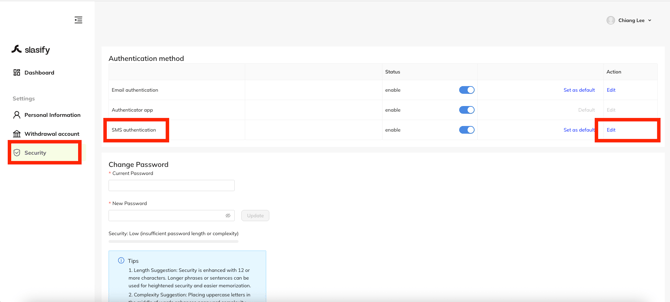
Please choose from “Security” under the “Settings” page, and click “edit” on the row “SMS authentication”.
-
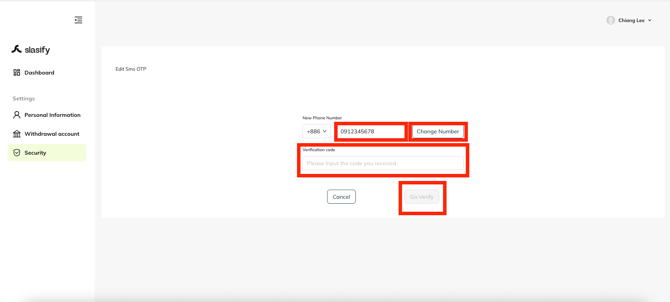
put a new number you want to change, and click “change number”
-
input the code you received on your phone as the “verification code”
-
click on “go verify”
-
done
-
-
After verifying successfully, the phone number is updated.
If you have any questions, please don’t hesitate to send us an email: hi@slasify.com
Or discuss your exclusive Slasify BD/AM
Thank you & stay well
Slasify Team
Last Updated: 2025.11.20 (v1.101.0)